
On this page
People grid
The People grid controls your capacity based on the people you plan to hire, fire or promote. Open it from the People chooser, which loads any Google Sheet you have access to that matches the expected format.
A row with Included set to false is left out of reporting. Rows like this are common, because the field exists for what-if modelling. See pending and included rows and capacity.
If a Save from the saved views menu fails, the People grid keeps the view's unsaved changes and its Unsaved marker, and the menu stays open with a message saying the view was not saved and why: your connection failed, the view changed elsewhere, or you can no longer change it.
The Quick metrics panel has From and To date inputs for the range its figures cover. A date is applied once it is complete, with a four-digit year; a partial year typed while entering a date is not applied. If you leave a field with an incomplete date, it returns to the last complete date.
Row history
Row history is switched on for individual accounts, not yet for everyone. On an account that has it, a database-backed People grid shows a History control at the end of each row. It opens the row's details on a History tab, which counts the changes made to that row.
Each entry names who made the change and how: in the app, an agent acting for a person, an import or the system. It gives the time, and one line for each field that changed, with the old value struck through, an arrow, and the new value. Values are shown the way the grid shows them. An agent's entry also says how many changes its call made. The Field and Who filters narrow the list, and the last line says when and by whom the row was created.
Restore previous value sets one field back and records the restore as a new change in your name, naming the change it reverts. The original entry stays. It is refused, with a message naming who changed the field since, when the field no longer holds the value that entry set. Changes made by imports and the system cannot be restored, and nothing can be restored while the grid has unsaved edits.
Deleted rows, beside the grid's view controls, lists rows that were deleted and not put back. Choose one to read its history and use Restore row, which puts it back with the values it last held. Anyone who can edit the grid can restore. Grids kept in Google Sheets keep no history here.
Reviewing agent batches
On accounts with the unlisted grid.row-history feature, agent history entries
link to a batch review page. A pending-review banner lists each unreviewed agent
batch separately. Save or cancel unsaved edits before opening it. The page shows
the recorded request, connection and changes. Authorized reviewers can Undo one,
Undo all eligible changes, or Keep all. Later edits block undo of the affected
field; the page lists skipped changes with the recorded actor and time. Keep
clears only the reviewed batch's banner. Original changes and undo remain in
history. This feature does not change Google Sheets navigation.
Grid history panel (opt-in)
The unlisted grid.history-panel feature is enabled separately for selected accounts; it is off on every default plan. Database grids also require row history on the same owning account. History opens a panel beside the grid; close it with Close or Escape while focus is inside it. Who filters All, People, Agents or Imports. Search matches row, field or actor, and Load earlier changes reads older complete row/save entries, newest first and grouped by your calendar day.
Select an entry to open the row's History tab, revealing it through current filters without saving the view. Deleted rows open read-only history. Agent entries identify the connection or API key and owning person; they do not represent an MCP session.
A small teal mark on an editable input names the most recent change in the last 24 hours, its actor, time and earlier value on hover or keyboard focus. Totals and calculated values have no mark. Recent agent batches have a Review changes link; save or cancel edits first. Keeping or fully undoing a batch removes its banner. All pending batches still provides access to older unresolved batches.
On Sheets-backed grids, History (in Google Sheets) opens the same authorized workbook editor in a new tab. The direct version-history destination is unverified. Use Google's File → Version history in that workbook, subject to your existing Google permissions. No local panel, cell marks or agent banner is shown for Sheets.
Agency gross income (AGI) is income after pass-through costs. Average billable rate (ABR) is income per delivery hour; model figures use planned capacity.
Three primary tasks
- Open your inputs. Select the account, open People, and choose the available grid. Confirm its title before editing. Sheet access and database membership determine which grids you can open.
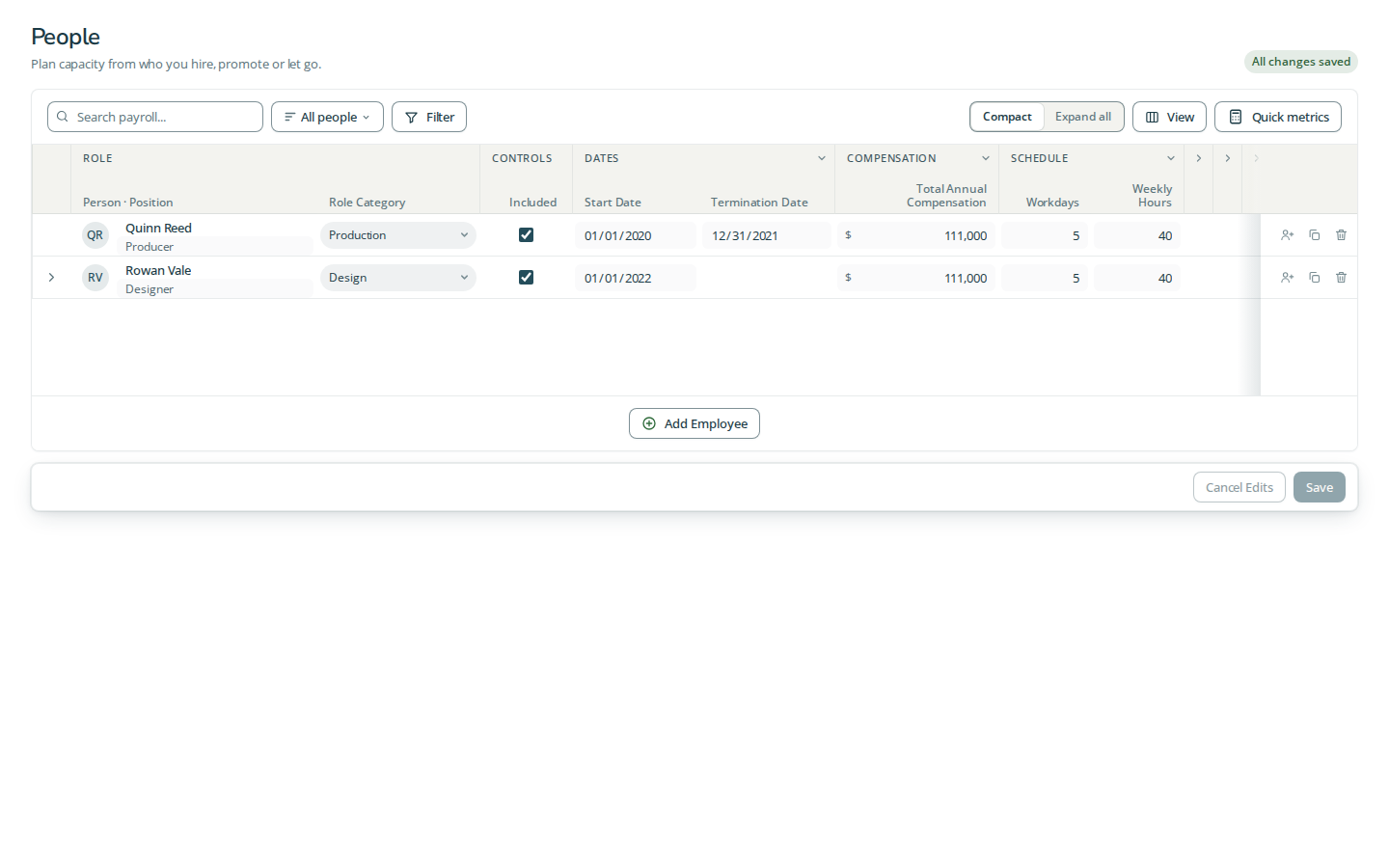
- Add or update a person. Use the add control below the table. Enter the person's name and position, dates, compensation and weekly allocation. Expand an existing person to add or inspect their entries when modelling a promotion. Choose Save after checking validation; Cancel Edits abandons the draft.
- Inspect capacity. Search for a person or filter by role or Included. Compact shows the current entry; Expand all exposes the other entries. Open Quick metrics and set From and To to compare gross and delivery capacity for the chosen period. A view filter does not exclude a row from reporting.
Columns and units
| Column | Meaning |
|---|---|
| Person · Position | The person groups their dated entries; Position names the job on an entry. |
| Included | Whether the entry contributes to reports. |
| Start Date | First eligible day; a blank date is allowed and precedes dated starts. The latest eligible start selects the active entry. |
| Termination Date | Last eligible date, inclusive. |
| Role Category | Groups the person's capacity for planning. |
| Total Annual Compensation | Annual currency cost, not a monthly amount. |
| Workdays | The person's typical days per week, used for PTO proportions. |
| Weekly Hours | Total weekly hours. Gross capacity divides by the agency's typical workdays, not this person's Workdays. |
| Client Delivery Hours | Weekly target spent on client delivery. |
| Delivery Overhead Hours | Weekly delivery-support allocation. |
| Sales & Marketing Hours | Weekly business-development allocation. |
| Back-office Hours | Weekly administration allocation. |
| Annual PTO Days | Annual paid time off, spread proportionally through reporting. |
| Target Hourly Rate | Planned currency earned per delivery hour. |
| Notes | Free text associated with the entry. |
Weekly allocations must reconcile with Weekly Hours. Converted reports use the account's Annual Days basis, default 261, for annual amounts. Hiding a column leaves its stored value intact.
Views and saving
Search narrows the visible rows. Filters select field values and show the applied choices; Clear removes the current search and filters. Column headings offer sorting where available. View controls choose visible columns and their arrangement. Saved views retain the view configuration for an account; they do not save source-row edits. Choose an account to save views when that option is unavailable.
Quick metrics opens the summary panel. Its From and To dates bound the summary, not the stored row dates. Check the units and period before comparing totals. Save writes row edits to the grid's configured storage; Cancel Edits discards unsaved row edits. Resolve validation messages before saving. Row actions duplicate or delete a row; People also offers employee-level actions. Administrative import and CSV tools are separate from member controls.
Fixture screenshot
Quick metrics
Performance Model shows Model ABR (currency per hour) and Model Utilization (delivery capacity divided by gross capacity). Capacity shows Gross Capacity and Delivery Capacity in hours. Financial shows AGI Capacity, Total Comp and its Delivery, Sales & Marketing and Admin allocations, plus Cost per Hour and Cost per Delivery Hour. The Agency Model link opens the calculator for the associated inputs when a model link is available. Checks flag invalid or inconsistent rows; resolve them rather than interpreting missing totals as zero.
Use the row expansion control to see details beyond the visible columns; horizontal scrolling reaches the remaining schedule, allocation and notes fields. Employee actions add an entry, duplicate the employee or delete the employee; entry actions affect the selected entry.
Questions and answers
What does the People grid control?
The People grid controls your capacity based on the people you plan to hire, fire or promote.
How do I load a People grid?
Open it from the People chooser, which loads any Google Sheet you have access to that matches the expected format.